Router
TP-Link's HB610 will be used for this project.
https://www.tp-link.com/hk/service-provider/wifi-router/hb610/
WAN interface name for HB610: eth0.4
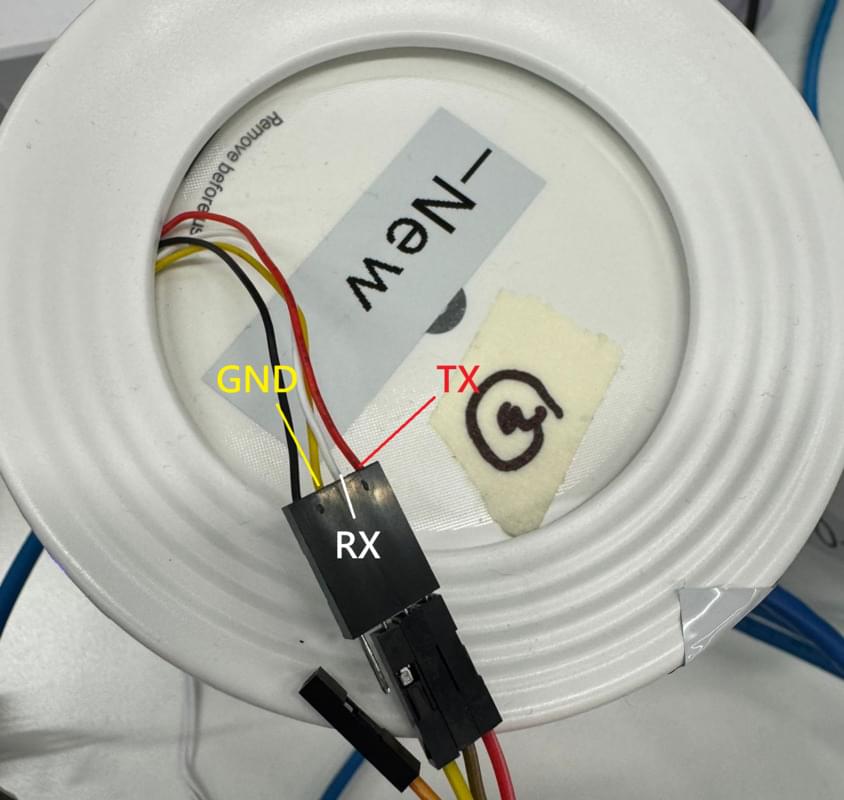
Serial connection
- Connection params: 115200, 8N1
- Pin layout:
| Pin | Colour |
|---|---|
| 3.3V | Not needed |
| TX (RX on router) | WHITE |
| RX (TX on router) | RED |
| GROUND | YELLOW |
Remote Management
- Login to
http://192.168.1.102/superadmin - Navigate to Advanced > System Tools > Administration
- Enable "Remote Management" for both HTTP and SSH
ssh admin@192.168.1.102
# type `sh` after login to get real shell